

auto_subscribe: true so streams sync automatically when clients connect.
Are you still using Sync Rules? Sync Streams support everything Sync Rules do, plus more expressive queries (including JOIN support), on-demand syncing, and a simpler developer experience (e.g. React hooks that manage subscriptions automatically).You can migrate in a few clicks. Click Migrate to Sync Streams in the PowerSync Dashboard, or run
powersync migrate sync-rules in the CLI to generate a draft from your current config. See Migrate to Sync Streams for details.How It Works
Each PowerSync Service instance has a deployed Sync Streams configuration: a YAML file that defines the streams that exist. Each stream has a name and a SQL-like query that selects the tables and columns to sync, filters rows by static conditions or by parameters, and can rename or transform columns. The Service uses this configuration in two places: when it replicates data from your source database into buckets, and when it streams those buckets to clients.Buckets and Parameters
PowerSync groups replicated data into buckets: partitions of data that are synced as a unit. A stream creates one bucket for each unique value of its filter, such as each user ID matched byauth.user_id() or each list_id that a client subscribes with. A stream without parameters creates a single bucket that syncs the same data to every subscriber.
Buckets are implicit in Sync Streams. The Service creates them from your stream queries, parameters, and subqueries, and you do not define or name them yourself. See Bucket Count for how queries determine the number of buckets.
Replication From the Source Database
The Service replicates and transforms data from your source database according to your stream queries, and persists the data and metadata in buckets. Buckets are updated incrementally, so they contain the latest state as well as a history of changes (operations). This operation history allows clients to sync only the deltas they need to get up to date. See Protocol for details.For example, a stream
user_lists with the query SELECT * FROM lists WHERE owner_id = auth.user_id() creates one bucket per user. If users A and B exist in the source database, the Service creates a bucket for each of them. When user A connects and subscribes, they sync only their own bucket.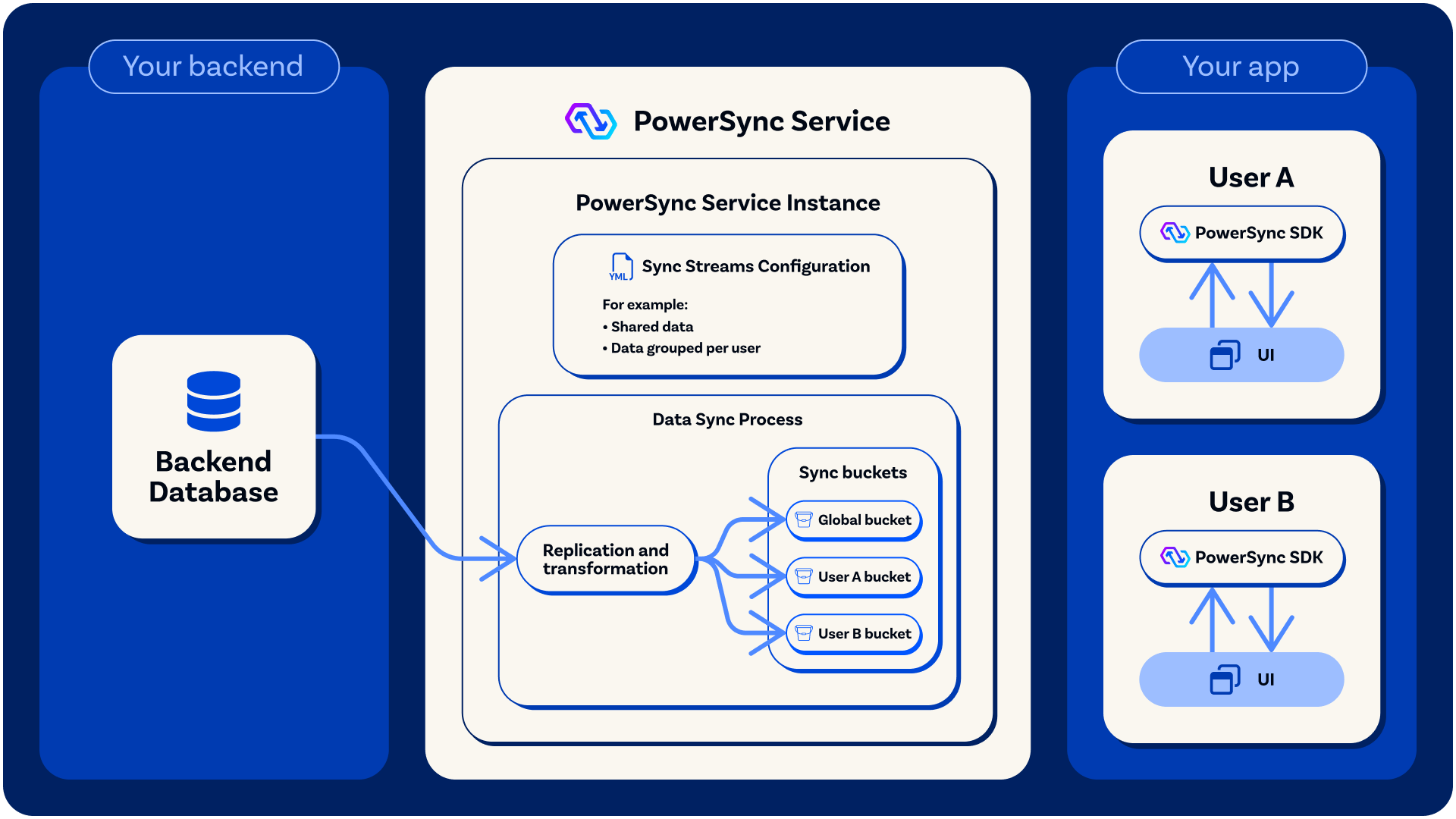
Data is replicated from the source database into buckets.
Streaming Sync to Clients
Whenever buckets change (buckets are added or removed, or operations are added to existing buckets), the Service streams these changes in real-time to the subscribed clients. The set of buckets a client receives adjusts as it subscribes to and unsubscribes from streams, and depends on its subscription, connection, and authentication parameters. On the client, bucket data is persisted in SQLite, where you query it through your client-side schema. See Client Architecture for the database structure.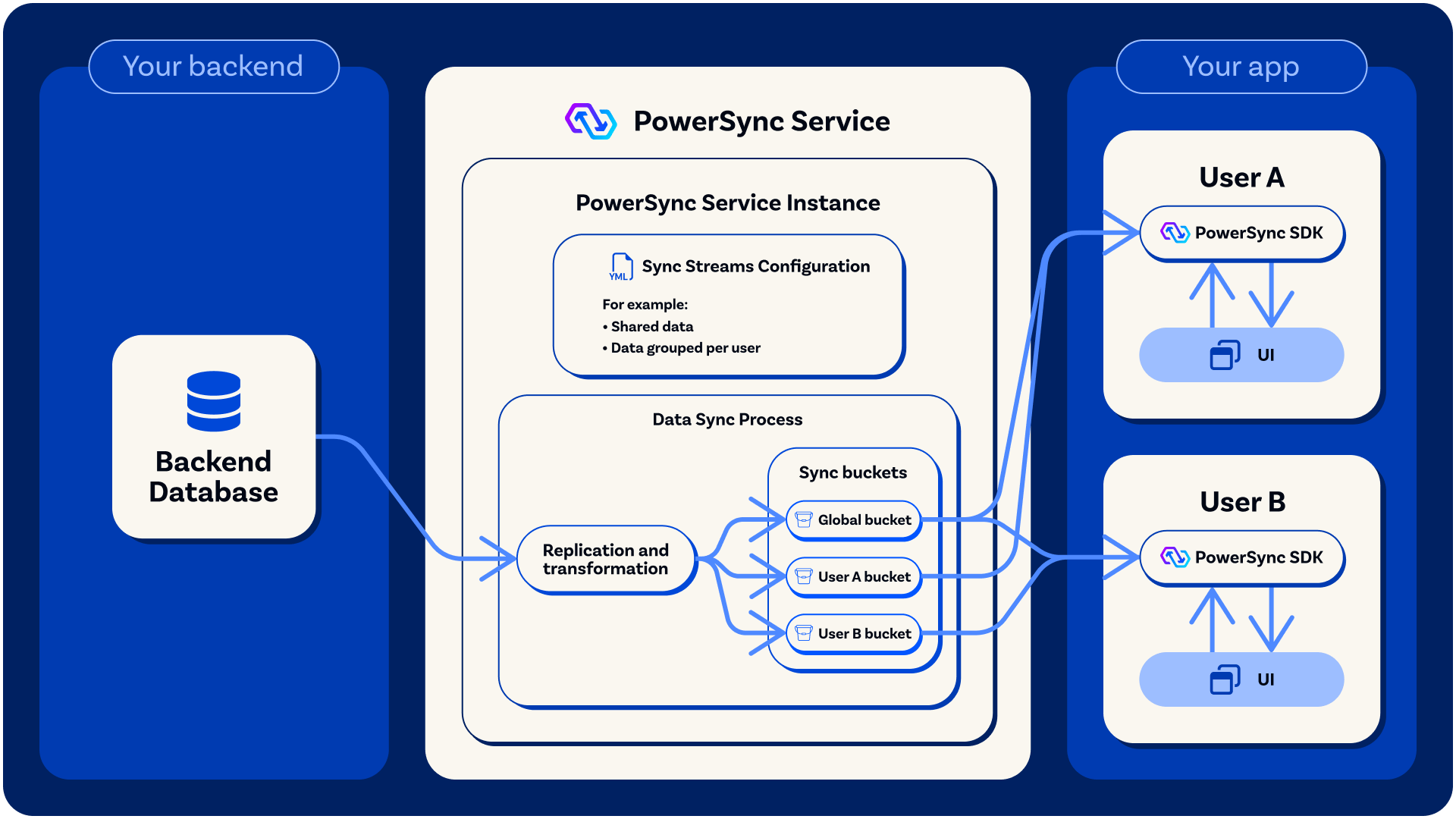
Operations in buckets are synced to clients in real-time based on their stream subscriptions, and a client-side SQLite database is materialized from the bucket data.
Next Steps
Quickstart
Define your first streams and subscribe to them from your app.
Using Parameters
Filter data with auth, subscription, and connection parameters.
Writing Queries
Query syntax, joins, subqueries, and multiple queries per stream.
Client-Side Usage
Manage subscriptions in each SDK and UI framework.